Is Donemax Worth It in 2026? Price, Who Should Buy It and Who Should Skip It
Short answer: Donemax is worth paying for if the free Data Recovery scan shows your lost files and you need more than the free 200 MB. Do not pay before you run that scan, because refunds cover technical faults only, not a change of mind. Prices below were read on Donemax’s official pages on 13 November 2026, and the code KUPONAUT (30% off all Donemax products, first purchase and renewals) was accepted when we applied it at checkout on 7 November 2026.
By Fırat Papatya · Published · 4 min read
Affiliate disclosure: Kuponaut is a Donemax affiliate partner and may earn a commission if you buy through the links or the code on this page, at no extra cost to you. Prices were read on Donemax’s official pages on 13 November 2026. Kuponaut applied the code at checkout on 7 November 2026. We did not use Donemax for this article, so it gives no rating for speed, quality or reliability.
The short answer
Donemax makes disk utilities for Windows and Mac: data recovery, disk cloning, secure erasing and NTFS for Mac. The table answers the five questions people ask before paying; the sections below give the detail and the sources.
| Question | Answer |
|---|---|
| Is Donemax worth paying for? | Yes, once the free scan shows your files; no before you have tried it |
| What does it cost? | Data Recovery is $89.95 a year or $109.95 lifetime for 2 computers; the other tools start at $9.95 |
| Is there a free plan or trial? | Yes: Data Recovery for Windows scans, previews and recovers up to 200 MB free |
| What is the cheapest way to get it? | A lifetime licence with the code KUPONAUT (30% off, applied at checkout on 7 November 2026) |
| Who should skip it? | Anyone who has not run the free scan yet, or who lost data on a phone |
From Donemax’s official pages. Prices were read again on 13 November 2026 and had not changed; the other terms were read on 16 October 2026.
What Donemax costs
Donemax sells each tool separately, as a yearly or a lifetime licence. Data Recovery costs the same on Windows and Mac and covers 2 computers. Its lifetime licence is only $20 more than one year.
The full record, with dates, is on Donemax pricing.
| Plan or item | What the official pages say |
|---|---|
| Free | Data Recovery for Windows scans, previews and recovers up to 200 MB; free limits for other tools not stated |
| Data Recovery | $89.95 a year or $109.95 lifetime for 2 computers (Windows or Mac); Enterprise lifetime $499 for 100 devices |
| DMclone / Data Eraser | $39.95 a year or $49.95 lifetime each |
| NTFS for Mac | $9.95 a month, $19.95 a year or $49.95 lifetime |
| Other tools | DMtrans $29.95 a year or $39.95 lifetime; DMcleaner for Mac $19.95 a month, $39.95 a year or $59.95 lifetime; DMmenu $9.95 a year or $19.95 lifetime |
| Refunds | 30-day money-back for duplicate purchases, unresolved technical faults or a licence code not delivered within 24 hours; not change of mind |
From Donemax’s official pages. Prices were read again on 13 November 2026 and had not changed; the other terms were read on 16 October 2026.
Who Donemax is worth it for
This is our reading of the official plan pages, not a hands-on review.
| You | Why it fits |
|---|---|
| Deleted files or formatted a drive on a PC or Mac | Data Recovery: free up to 200 MB on Windows, then $89.95 a year or $109.95 lifetime for 2 computers |
| Are moving to a new disk | DMclone is $39.95 a year or $49.95 lifetime |
| Use Windows-formatted drives on a Mac | NTFS for Mac is $9.95 a month, $19.95 a year or $49.95 lifetime |
| Want to wipe a drive before selling it | Data Eraser is $39.95 a year or $49.95 lifetime |
Who should skip Donemax
The comparison behind this table carries its own read date: Donemax vs Recoverit.
| You | What to look at instead |
|---|---|
| Have not tried the free version yet | Run the free scan first. Donemax does not refund a change of mind, or a purchase made without trying the trial (refund policy, read 19 October 2026) |
| Lost data on a phone | A phone recovery tool fits better; see Dr.Fone |
| Need to recover more than 200 MB before paying | Recoverit’s free version recovers up to 500 MB on Windows according to Wondershare’s free-version page (read 27 October 2026); another Wondershare page says 100 MB |
| Need the tool once and never again | One year of Data Recovery is $89.95 and there is no monthly option, so check first whether the free 200 MB is enough |
Which plan makes sense
Pick the tool first, then the licence length.
| If you | Pick | Why |
|---|---|---|
| Need to recover files now, and maybe again later | Data Recovery, lifetime | $109.95 for 2 computers, $20 more than one year |
| Clone or wipe a disk | DMclone or Data Eraser, lifetime | $49.95 each, against $39.95 for one year |
| Need NTFS on a Mac for a short job | NTFS for Mac, 1 month | $9.95; the yearly licence is $19.95 |
| Manage many machines | Data Recovery, Enterprise lifetime | $499 for 100 devices |
The cheapest way to get Donemax
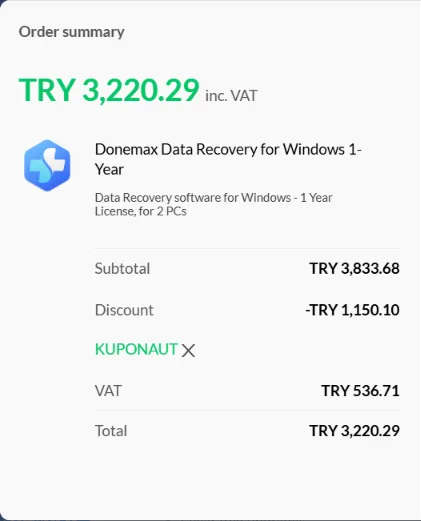
Lifetime is the better list price if you may need the tool again: $109.95 against $89.95 for one year of Data Recovery. The code KUPONAUT takes 30% off every Donemax product, on the first purchase and on renewals.
Enter KUPONAUT at checkout. Applied at checkout by Kuponaut on 4, 6 and 7 Nov 2026: code KUPONAUT was accepted (30% off all Donemax products, first purchase and renewals). Confirm the final total on your own order. The full record is on Donemax discount code.
At 30% off, Data Recovery lifetime comes to about $76.97, and DMclone or NTFS for Mac lifetime to about $34.97, calculated from the list prices. Our checkout test was opened from Turkey and showed Turkish lira, so your currency and taxes may differ.
On refunds, Donemax’s own pages say: 30-day money-back for duplicate purchases, unresolved technical faults or a licence code not delivered within 24 hours; not change of mind.
What we checked and what we did not
Checked: plan prices on Donemax’s official pages, read again on 13 November 2026 (other terms read on 16 October 2026); the code, applied at checkout on 7 November 2026.
Not checked: we did not use Donemax for this article. It gives no rating for speed, quality or reliability, and the comparison pages linked above carry their own read dates.
Frequently asked questions
Is Donemax worth it?
It is worth it if the free scan finds your files and you need to recover more than 200 MB: Data Recovery is $89.95 a year or $109.95 lifetime for 2 computers. Run the free version first, because refunds cover technical faults only. This answer is based on Donemax’s official pages; prices were read again on 13 November 2026. We did not use Donemax to recover files for this article.
How much does Donemax cost?
On 13 November 2026: Data Recovery $89.95 a year or $109.95 lifetime; DMclone and Data Eraser $39.95 a year or $49.95 lifetime each; NTFS for Mac $9.95 a month, $19.95 a year or $49.95 lifetime. The dated record is on Donemax pricing.
Is Donemax Data Recovery free?
The free version for Windows scans, previews and recovers up to 200 MB. Free limits for the clone, eraser and NTFS tools are not stated on Donemax’s pages.
Does Donemax give refunds?
There is a 30-day money-back guarantee for cases such as a duplicate purchase, a technical fault that support cannot fix, or a licence code not delivered within 24 hours. A change of mind is not covered.
Does the KUPONAUT code work on Donemax?
Yes. Kuponaut applied it at Donemax’s checkout on 4, 6 and 7 November 2026 and it took 30% off. Donemax confirmed that it covers all products, the first purchase and renewals. See Donemax discount code.
Should I buy the yearly or the lifetime Donemax licence?
For Data Recovery the lifetime licence is $109.95 against $89.95 for one year, so lifetime costs $20 more and does not renew. Both cover 2 computers.
Related code pages
- Donemax discount code — Tested at checkout November 7, 2026: 30% off all Donemax products, first purchase and renewals.
- Donemax: donemax pricing
- Donemax vs Recoverit (2026): Data Recovery Prices, Free Limits and Lifetime Licences
- How to recover deleted or formatted files with Donemax Data Recovery (SD card, USB, hard drive)