Is Google Vids free? We made one of the three free 15-second Omni 1.2 Flash clips, and when Pictory, Klap or WayinVideo fit better
On 5 November 2026 Google opened AI video in Google Vids to every Google account: up to three 15-second clips a month, at no cost. We used one of our three to make a short coffee-shop promo and looked at what you really get, what went wrong, and which tool to pick when 45 seconds a month is not enough.
Tried 9 November 2026 in a personal Google account (Vids interface in Turkish): one Omni clip, 720p, landscape, 15 seconds. Limits from Google's announcement of 5 November 2026 and the Vids help page, read 9 November 2026. Partner prices from each official pricing page, dates in the table. Published November 9, 2026.
Affiliate disclosure: Pictory, Klap and WayinVideo links on this page are our partner links, and KUPONAUT is our code with each of them. If you buy through them, Kuponaut may earn a commission at no extra cost to you. Google Vids is not a partner, and the partnership does not change what we report.
Short answer
- Yes, within a limit. Since 5 November 2026 anyone with a Google account or a Workspace subscription can generate up to three 15-second videos a month in Google Vids at no cost, with Google's new Omni 1.2 Flash model. Start at vids.new.
- Our clip took about 2 minutes. The leaf logo on the mug stayed the same in every shot and all three narration lines made it into the voice-over. The slip: in the last second the clip pours milk again into a mug that already has latte art.
- Three clips are 45 seconds a month. That is enough to try an idea or make one short teaser, not to fill a weekly posting plan.
- Need longer narrated videos from a script or article? Look at Pictory. Need many short clips from a long video, podcast or webinar? Look at WayinVideo or Klap. All three have a KUPONAUT code.
Applied at checkout by Kuponaut on 4, 6 and 7 Nov 2026: code KUPONAUT was accepted (20% off). Confirm the final total on your own order.
What Google changed on 5 November 2026
Google says Vids now runs on its newest video generation model, Omni 1.2 Flash, and that anyone with a Google account or a Google Workspace subscription can now generate up to three 15-second videos a month in Vids at no cost. Google pitches it for product promos made in one take, videos from your own reference images with consistent characters, and more natural narration.
There was a different free offer before. On 2 April 2026 Google wrote that all personal accounts get 10 video generations a month with Veo 3.1. The November post gives fewer but longer clips. We follow the newer post; Google does not say whether the April allowance still applies next to it.
| Question | What Google says |
|---|---|
| Who gets free clips | Anyone with a Google account or a Google Workspace subscription (announcement, 5 Nov 2026) |
| How many | Up to three 15-second videos a month at no cost |
| Paid and eligible Workspace accounts | Most users can generate up to 50 videos a month (help page) |
| Clip length | 3 to 15 seconds when you generate; 3 to 10 seconds when you animate a photo or edit a video |
| Picture | 720p or 1080p, 24 frames a second, landscape (16:9) or portrait (9:16) |
| When the limit resets | Midnight Pacific time on the first day of each month |
| Where you can use the clips | The help page says generated images and videos are for use only within Vids |
| Regional limits | Uploading your own video to edit it with AI is restricted in the EEA, the UK, Switzerland, Illinois and Texas |
Announcement of 5 November 2026 and the Vids help page, both read 9 November 2026. The help page does not separate personal accounts from Workspace plans.
Our try: one free clip, start to finish
We wanted a realistic small-business job: a 15-second promo for a fictional café, with a logo, a camera move, a product shot and a voice-over. We wrote one prompt in English and used one of the account's three free clips on it.
A 15-second product promo for a fictional coffee shop called Bloom & Brew. Morning light in a small cafe: a barista pours latte art into a white ceramic mug with a small green leaf logo, steam rises, the camera slowly pushes in, then the mug is placed on a wooden counter next to a croissant. A warm female narrator says: "Bloom and Brew. Fresh coffee, made slow. Open every day from seven." End on the mug with the logo facing the camera.
- Open vids.new and choose the AI video option (the card that says Omni turns text, images or audio into short videos).
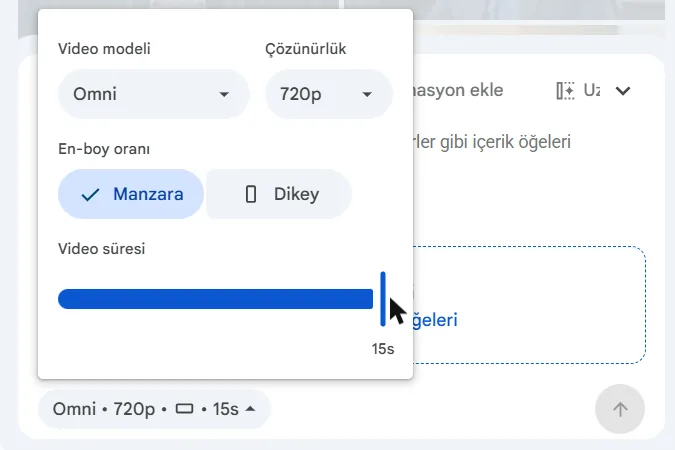
- Open the settings under the prompt box and check them before you generate. In our account the length started at 10 seconds; we moved it to 15.
- Pick the model (Omni), the resolution (720p or 1080p) and landscape or portrait.
- Paste the prompt and send it. Our clip was ready in about 2 minutes.
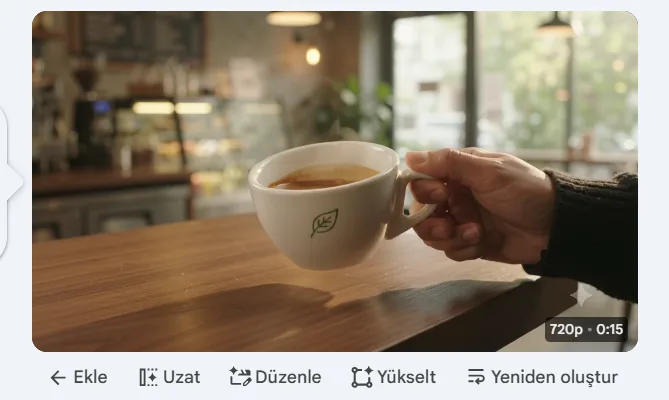
- Watch the clip in the side panel, then add it to the timeline to cut, add music or captions, and finish the video in Vids.
Vids did not show how many free clips we had left. Keep your own count if you plan to use all three.
What came out



| Check | Our result |
|---|---|
| Time to generate | About 2 minutes |
| Length and quality | 0:15 at 720p, as labelled in Vids |
| Logo | The small green leaf logo stayed the same in every shot we checked |
| Shot order | Close, not exact: the clip opens on a hand holding a full cup of black coffee, then the milk pour (about 4 s), latte art and the croissant (about 8 to 12 s) |
| Narration | All three lines are in the voice-over, going by the transcript Vids made. It marks a 6.7-second pause before the first line |
| Mistake | At 14.7 seconds milk is poured again into a mug that already has latte art |
| Marks on the video | A small four-point sparkle mark in the bottom-right corner of the frames we checked |
One clip, one prompt, 9 November 2026. Another prompt or a regenerated clip can look different.
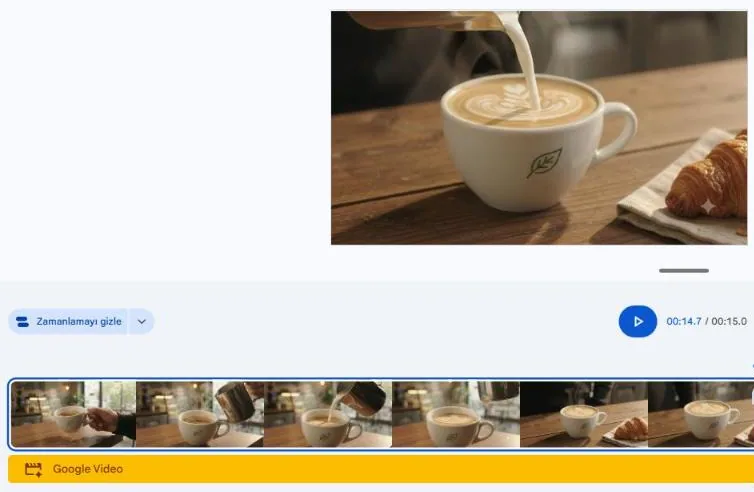
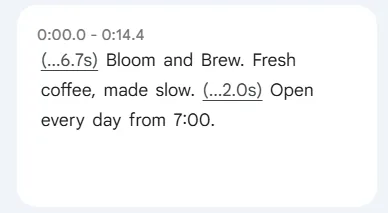
For a free tool this is a usable social teaser: the product looks real, the branding holds and every line of the voice-over is there. But we would cut the last second before posting it, and with the pause at the start the voice-over only begins about 7 seconds in.
How to write a prompt that fits 15 seconds
- Keep the voice-over short. Our 12 spoken words fitted easily; 15 seconds leaves room for about two short sentences, not a paragraph.
- Describe the logo or product in plain words (“a small green leaf logo”). It stayed identical in every shot of our clip.
- Write the shots in the order you want, but expect the model to change the order a little. Ours started with a full cup before the pour.
- Name the last frame you want, then check the last second. That is where our clip went wrong.
- Decide length, resolution and orientation before you generate. With three clips a month, a wrong setting costs a third of your allowance.
We wrote our prompt by hand. If you ask ChatGPT, Claude or Gemini to draft one, give it the limits up front, for example with this brief:
Write a prompt for Google Vids (Omni model) for a 15-second landscape promo. Product: [your product]. Describe 3 shots in order, one sentence each, with one camera move. Describe the logo in plain words. Add a voice-over of at most 15 words in quotation marks. Say what the last frame shows.
Is three clips a month enough? When to use Pictory, WayinVideo or Klap
Three 15-second clips add up to 45 seconds a month. You can put them one after another on the Vids timeline, but that is still one short video. If you post every week, or need videos longer than a teaser, a dedicated tool does more of the work.
Applied at checkout by Kuponaut on 4, 6 and 7 Nov 2026: code KUPONAUT was accepted (20% off). Confirm the final total on your own order.
WayinVideo or Klap? Klap's plans count clips (Basic includes 100 a month), WayinVideo's count minutes of source video (one credit is one minute) and it has a free start with 100 sign-up credits. Our side-by-side: WayinVideo vs Klap.
Pictory, Klap and WayinVideo: prices and the KUPONAUT code
| Tool | Best for | Free start | Paid from (USD, monthly billing) | Code KUPONAUT |
|---|---|---|---|---|
| Pictory | Videos from scripts, articles and slides | 14-day trial: 3 projects, watermarked downloads | Starter $29 a month, or $25 a month billed yearly (read 25 Oct 2026) | 20% off. Applied at checkout by Kuponaut on 4, 6 and 7 Nov 2026 and accepted |
| Klap | Long video into short vertical clips | One free video, no card | Basic $29 a month (100 clips); Pro $79, shown as $59 in some regions (read 30 Oct 2026) | 30% off the first month. At checkout on 14 Oct 2026, Pro monthly $59 became $41.30 |
| WayinVideo | Long video into clips, summaries and captions | 100 one-time sign-up credits, no card, 720p export | Starter $15.99 a month for 500 credits (read 12 Nov 2026) | 25% off the first payment. Applied at checkout by Kuponaut on 13 Oct 2026; the discount showed before payment |
Prices before tax from each official pricing page on the date shown. We did not run our café prompt through these tools: they do a different job. Full records: Pictory code, Klap pricing, WayinVideo pricing.
Applied at checkout by Kuponaut on 14 Oct 2026 — Pro monthly $59 → $41.30 for the first month. Confirm the final total on your own order.
Applied at checkout by Kuponaut on 13 Oct 2026 — the discount showed before payment. Confirm the final total on your own order.
Mistakes to avoid
- Spending all three free clips on first drafts. Write and check the prompt and settings first.
- Posting without watching the last second. Our only mistake was at 14.7 seconds.
- Treating Vids clips as stock footage for other apps. Google's help page says generated videos are for use only within Vids, so build and finish the video there.
- Expecting a counter. We saw no remaining-clips number in Vids.
- Paying for a clipping tool when you only need one teaser, or trying to build a weekly content plan from 45 free seconds.
More video tools side by side: best AI video tools and our clip-tool test, Submagic vs OpusClip vs Vizard.
Frequently asked questions
Is Google Vids free?
Yes, within a limit. Since 5 November 2026 anyone with a Google account or a Workspace subscription can generate up to three 15-second AI videos a month in Vids at no cost (Google's announcement). We made one on 9 November 2026 with a personal account.
What is Omni 1.2 Flash?
It is Google's newest video generation model, which Google Vids now runs on (Google, 5 Nov 2026). In Vids it appears as “Omni” in the video model menu.
How long can a Google Vids AI clip be?
The help page says 3 to 15 seconds when you generate a clip, and 3 to 10 seconds when you animate a photo or edit a video. Our clip was 15 seconds at 720p.
How long does Google Vids take to make a clip?
Our 15-second, 720p clip was ready in about 2 minutes on 9 November 2026.
When do the free Google Vids clips reset?
Google's help page says the monthly limit resets at midnight Pacific time on the first day of the month.
Does Google Vids add a watermark?
The help page does not mention a visible watermark; it links to Google's page on AI labels and content credentials. In our clip a small four-point sparkle mark was visible in the bottom-right corner.
Google Vids or Pictory?
For a 15-second teaser, Google Vids is enough and free. For narrated videos longer than a teaser, made from a script, blog post or slides, Pictory is built for that. Code KUPONAUT gives 20% off; Kuponaut applied it at checkout on 4, 6 and 7 Nov 2026 and it was accepted.
Sources
- Google: Generate longer AI videos with Omni 1.2 Flash in Google Vids at no cost (5 Nov 2026, read 9 Nov 2026)
- Google Vids Help: generate videos with Omni (limits, lengths, resolution, regions), read 9 Nov 2026
- Google: earlier Vids update with Veo 3.1 for personal accounts (2 Apr 2026, read 9 Nov 2026)
- Pictory pricing page, read 25 Oct 2026
- Klap pricing page, read 30 Oct 2026
- WayinVideo pricing page, read 28 Oct 2026
Related pages
Affiliate disclosure: Pictory, Klap and WayinVideo links on this page are our partner links, and KUPONAUT is our code with each of them. If you buy through them, Kuponaut may earn a commission at no extra cost to you. Google Vids is not a partner, and the partnership does not change what we report.
A code-free copy of this article is also published on: Dev.to (canonical URL is this page).