Submagic vs OpusClip vs Vizard: which one for your videos, and can ChatGPT or Gemini pick the clips for free?
OpusClip and Vizard turn a long video into short clips. Submagic polishes a short video with captions and B-roll. We compared their official prices and free plans, and tested whether ChatGPT and Gemini can find the best clip moments in a transcript before you spend any credits.
Tested 7 November 2026: the same podcast transcript and prompt in ChatGPT (Instant) and Gemini (3.8 Flash). Prices read the same day on each official pricing page. Published November 7, 2026.
Affiliate disclosure: OpusClip, Vizard and Submagic links on this page are our partner links. If you buy through them, Kuponaut may earn a commission at no extra cost to you. It does not change the prices or test results.
Short answer
- Long podcast, webinar or stream: OpusClip or Vizard. Both find moments, cut them to vertical clips and caption them. A short video you recorded yourself: Submagic.
- Cheapest per minute on yearly billing: Vizard Creator at $14.50 a month for 600 minutes, about 2.4 cents a minute. OpusClip Pro yearly is $11.50 a month for 300 minutes, about 3.8 cents.
- Both OpusClip and Vizard have a free plan with 60 credits a month (1 credit = 1 minute of video), with limits such as watermarks and a 3-day window. Submagic has no permanent free plan, only a trial.
- ChatGPT and Gemini picked almost the same three moments from our transcript and skipped the filler. ChatGPT gave clean timestamps at once; Gemini's first answer lost them and needed one follow-up. They cannot cut the video, but they can tell you which parts to upload.
Our partner link. If you buy through it, Kuponaut may earn a commission at no extra cost to you.
Test files (download and try it yourself)
- podcast-transcript-side-hustle.txt: A fictional 6-minute podcast episode with timestamps that we wrote for this test. It has three strong moments and some filler (housekeeping at 00:15).
What each tool is for
| OpusClip | Vizard | Submagic | |
|---|---|---|---|
| Main job | Long video to short clips | Long video to short clips | Captions and editing for short videos |
| Free plan | Yes: 60 credits a month | Yes: 60 credits a month | No: free trial without a card |
| How usage is counted | 1 credit = 1 minute of uploaded video | 1 credit = 1 minute | Videos per month, with a length limit per video |
| Free plan limits | Watermark, no editing, up to 1080p, clips must be exported within 3 days | 720p, 3-day storage, uploads up to 60 min and 1 GB, 10-minute export | Trial: watermark, one free post |
| Cheapest paid plan | Starter $12 a month (monthly only), 150 credits | Creator $29 a month or $14.50 billed yearly, 600 credits | Starter $19 a month or $12 billed yearly, 15 videos up to 2 min |
USD before tax, read on each official pricing page on 7 Nov 2026 from Turkey. Prices can differ by country and change; check the total at checkout.
If your source is a one-hour recording, you need OpusClip or Vizard: they watch the whole thing and suggest clips. If you film 30-second videos on your phone, Submagic's per-video plans and caption tools fit better. Our Submagic + ChatGPT script guide covers that workflow.
Cost per minute of video (official prices, 7 November 2026)
| Plan | Price per month | Minutes or videos | Cost per unit |
|---|---|---|---|
| OpusClip Starter | $12 (monthly only) | 150 minutes | 8.0 cents a minute |
| OpusClip Pro, monthly | $23 | 300 minutes | 7.7 cents a minute |
| OpusClip Pro, yearly | $11.50 ($138 a year) | 300 minutes | 3.8 cents a minute |
| Vizard Creator, monthly | $29 | 600 minutes | 4.8 cents a minute |
| Vizard Creator, yearly | $14.50 ($174 a year) | 600 minutes | 2.4 cents a minute |
| Vizard Business, yearly | $19.50 ($234 a year) | 600 minutes | 3.3 cents a minute |
| Submagic Starter, monthly / yearly | $19 / $12 | 15 videos up to 2 min | $1.27 / $0.80 a video |
| Submagic Pro, monthly / yearly | $39 / $23 | 40 videos up to 5 min | $0.98 / $0.58 a video |
Our arithmetic from the official prices: price divided by the minutes or videos a plan includes. Assumes you use the whole monthly allowance.
A one-hour podcast every week is about 240 to 300 minutes a month. That fits OpusClip Pro (300 credits) or Vizard Creator (600 credits), but not OpusClip Starter (150). On a free plan, 60 credits cover one hour-long episode a month.
Check when credits expire. OpusClip's help pages say monthly-plan credits last 60 days, while its pricing page mentions a 2-month rollover on yearly Pro, so read the terms for the plan you pick. See the OpusClip pricing details.
Our test: can ChatGPT and Gemini pick the clips?
We wrote a 6-minute podcast episode with timestamps (download it above). It has three strong moments, a weaker fourth one and some filler, so we knew the right answer before we started. Both assistants got the same prompt.
Below is a podcast transcript with timestamps. Pick the 3 best moments for 30-60 second vertical clips (TikTok, Reels, Shorts). For each clip give: start and end timestamp, a hook title under 8 words, and one sentence on why it works. Do not pick housekeeping or filler. Use only timestamps that appear in the transcript. [transcript pasted here]
| Check | ChatGPT (Instant) | Gemini (3.8 Flash) |
|---|---|---|
| Answer time | About 20 seconds | About 35 seconds |
| Clip 1 | 00:31–01:10 (39 s): “11 Friends Bought. Zero Strangers Did.” | 00:31–01:28 (57 s): “Why Friends Lie About Your Business” |
| Clip 2 | 02:05–03:02 (57 s): the time math | 02:05–03:02 (57 s): “Are You Earning Less Than Minimum Wage?” |
| Clip 3 | 04:20–05:15 (55 s): “Zero Sales? Don't Lower Your Price.” | 04:20–05:15 (55 s): “Change the Niche, Not the Price” |
| Skipped the filler | Yes | Yes |
| Timestamps on screen | Yes, at once | Missing in the first answer; fixed after one follow-up |
| Extra | Said which clip to post first (clip 2) | Stronger hook titles |
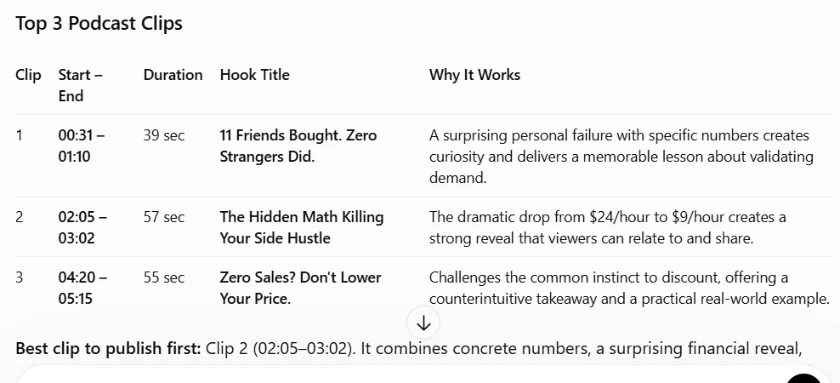
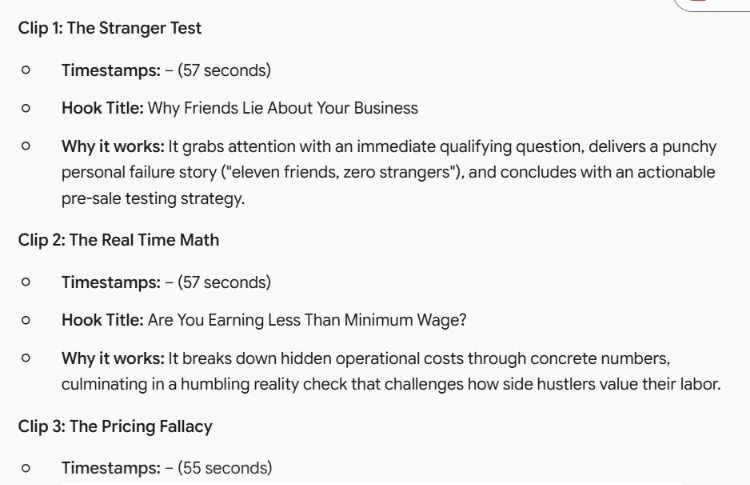
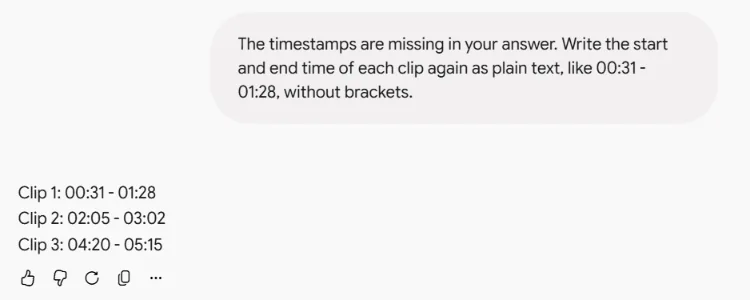
Both found the same three moments we had planted, and both kept every clip between 30 and 60 seconds. Neither picked the fourth candidate, “never buy first” at 03:05–03:48, which is also usable. Gemini wrote the catchier titles, but its first answer showed “Timestamps: – (57 seconds)” with the times missing. This follow-up fixed it:
The timestamps are missing in your answer. Write the start and end time of each clip again as plain text, like 00:31 - 01:28, without brackets.
How to combine them and save credits
ChatGPT and Gemini read text, not video. They cannot cut, reframe or caption the clip. But because OpusClip and Vizard charge by uploaded minutes, knowing the good parts in advance can save most of your credits.
- Get a transcript with timestamps from your recording or editing app.
- Paste it into ChatGPT or Gemini with the prompt above and check the times against the transcript.
- Trim the recording to those parts in any free editor. Three one-minute parts are about 3 minutes instead of 60.
- Upload only the trimmed file to OpusClip or Vizard for vertical framing, captions and export. In our transcript that would be about 3 credits instead of 6, and for an hour-long episode about 3 instead of 60.
- Use the chatbot's hook titles as your on-screen title or post caption.
If you prefer the tool to choose for itself, upload the whole video and compare its suggestions with the chatbot's list. When both pick the same moment, that is usually the clip to post first.
Our partner link. If you buy through it, Kuponaut may earn a commission at no extra cost to you.
Which one should you pick?
Side-by-side pages with more plan detail: OpusClip vs Vizard and Vizard vs Submagic.
Our partner link. If you buy through it, Kuponaut may earn a commission at no extra cost to you.
Our partner link. If you buy through it, Kuponaut may earn a commission at no extra cost to you.
Frequently asked questions
Is OpusClip or Vizard cheaper?
On yearly billing, Vizard Creator works out cheaper per minute: $14.50 a month for 600 minutes, about 2.4 cents a minute, against OpusClip Pro at $11.50 for 300 minutes, about 3.8 cents (official prices, 7 Nov 2026). On monthly billing, OpusClip Starter is the cheapest entry at $12.
Do OpusClip and Vizard have free plans?
Yes. Both give 60 credits a month, and 1 credit is 1 minute of video. OpusClip's free clips have a watermark, no editing and must be exported within 3 days; Vizard's free plan is 720p with 3-day storage.
Can ChatGPT make short clips from a podcast?
It cannot cut video, but it can read a transcript and tell you which parts to clip. In our test ChatGPT and Gemini picked the same three moments we had planted and skipped the filler.
Is Submagic good for long videos?
Submagic's plans count videos with a length limit per video: 2 minutes on Starter, 5 on Pro, 30 on Business (official pricing page, 7 Nov 2026). It suits short videos best; for long recordings, OpusClip or Vizard are built for finding clips.
Does Kuponaut have codes for OpusClip, Vizard or Submagic?
No. We have partner links only. If you buy through them, Kuponaut may earn a commission. We only publish codes we have tested at checkout.
Sources
Related pages
Affiliate disclosure: OpusClip, Vizard and Submagic links on this page are our partner links. If you buy through them, Kuponaut may earn a commission at no extra cost to you. It does not change the prices or test results.