How to use Submagic with ChatGPT or Gemini: from script to captioned short video
Submagic puts captions, zooms and B-roll on a video you record. It does not write what you say. So we tested which assistant writes the better script for it: ChatGPT and Gemini got the same 30-second brief with strict caption rules.
Tested 7 November 2026: the same prompt in ChatGPT (Instant) and Gemini (3.8 Flash). Submagic prices read the same day on its official pricing page. Published November 7, 2026.
Affiliate disclosure: Submagic links on this page are our partner links. If you buy through them, Kuponaut may earn a commission at no extra cost to you. It does not change the test results.
Short answer
- Write the script in ChatGPT or Gemini, record it, then let Submagic add captions, zooms, B-roll and silence removal. The chatbot is the writer, Submagic is the editor.
- In our test ChatGPT wrote 10 timed lines that fill 30 seconds and invented nothing, but it used 4 capital words when we asked for 3. Gemini kept exactly 3, but wrote only 31 words and its hook said the box had already “dropped” although the launch was still ahead.
- Submagic has no permanent free plan. There is a free trial without a card (with a watermark). Paid plans start at $19 a month, or $12 a month billed yearly, for 15 videos of up to 2 minutes each.
- We did not open a Submagic account for this guide. The Submagic steps come from its official pages; the script test and screenshots are ours.
Our partner link. If you buy through it, Kuponaut may earn a commission at no extra cost to you.
Who does what: Submagic vs ChatGPT and Gemini
| Job | Submagic | ChatGPT / Gemini |
|---|---|---|
| Write the script and the hook | No | Yes, in seconds |
| Timed lines and B-roll ideas | No | Yes, if you ask |
| Captions burned into the video | Yes: 123 languages, translation into 100+ | No |
| Auto zoom, B-roll, silence and bad-take removal | Yes | No |
| On-screen hook title | Yes (AI hook title) | Can suggest the words |
| Post to TikTok, Reels, Shorts | Yes, built-in scheduler | No |
Submagic features as listed on its official pages on 7 Nov 2026.
So the real question is not “Submagic or ChatGPT” but which chatbot gives Submagic a better script. Auto captions only look good when the lines are short, so we wrote the caption rules straight into the prompt.
Step 1: the prompt we used (copy it)
We invented a small coffee shop, Bloom & Brew, and gave both assistants the same facts: a holiday gift box with 3 coffees and a mug, 39 euros, launch on Monday 23 November, 500 boxes. Change the facts to your own product and keep the rules.
Write a 30-second vertical video script (TikTok, Reels, Shorts) that announces the Bloom & Brew holiday coffee gift box. Bloom & Brew is a fictional coffee subscription shop. Facts: the box has 3 seasonal coffees and a mug, it costs 39 euros, it launches on Monday 23 November and there are only 500 boxes. Rules, because the video will get automatic captions: no line longer than 6 words, a hook in the first 2 seconds, write 3 words to highlight in CAPITALS, put a B-roll idea in [brackets] after each line, and end with a call to action. Do not add facts I did not give you. Then give a title and 5 hashtags.
- No line longer than 6 words: Submagic shows captions a few words at a time, so short lines stay readable on a phone.
- A hook in the first 2 seconds: viewers decide straight away whether to keep watching.
- 3 words in CAPITALS: these become the words you highlight in the caption style.
- A B-roll idea in [brackets]: you can match each one to Submagic's B-roll or film it yourself.
- “Do not add facts I did not give you”: stops invented prices, dates and claims.
Test result: ChatGPT vs Gemini
| Check | ChatGPT (Instant) | Gemini (3.8 Flash) |
|---|---|---|
| Answer time | About 15 seconds | About 25 seconds |
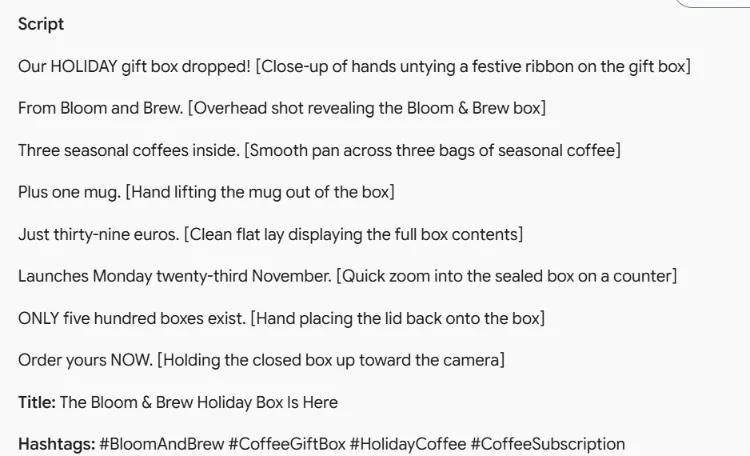
| Lines | 10, each with a time code from 0:00 to 0:30 | 8, no time codes |
| Every line 6 words or fewer | Yes | Yes |
| Exactly 3 CAPITAL words | No: 4 (STOP, PRICE, LAUNCH, LIMITED) | Yes (HOLIDAY, ONLY, NOW) |
| Long enough for 30 seconds | Yes: 49 words with time codes | Probably not: 31 words |
| Invented facts | None | None, but the hook says the box “dropped” and the title says it “is here”, while the launch is on 23 November |
| Numbers | €39, 23 November, 500 | Written out: “thirty-nine euros”, “five hundred” |
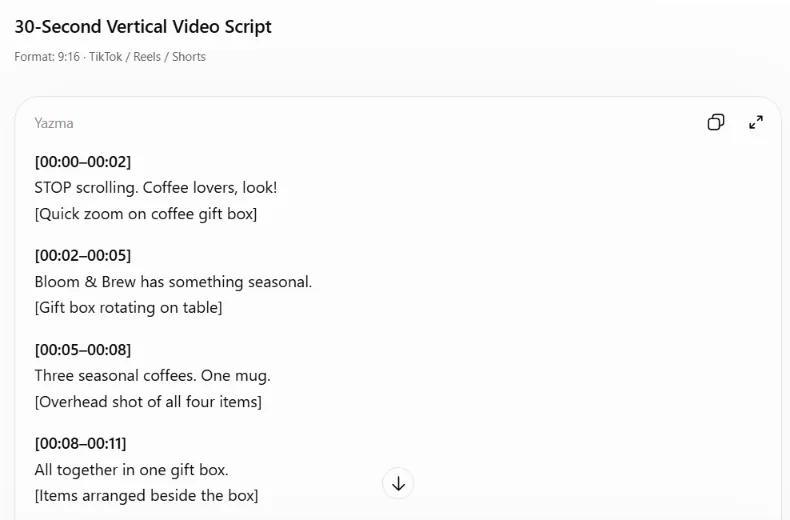
ChatGPT's script is the one we would record. It reads well aloud, and the time codes make pacing easy. Its only miss is one extra capital word, which takes seconds to fix.
Gemini's lines are clean and it followed the capitals rule exactly. But you would need to add more lines to fill 30 seconds, and fix the hook so it does not sound like the box is already on sale. Spelled-out numbers are fine for speech, but on screen “€39” reads faster than “thirty-nine euros”. If you want digits in your captions, say so in the prompt.
One test is not a ranking. Both assistants broke one rule, which is exactly why the next step matters.
Step 2: check the script before you record
- Go through your rules one by one: line length, hook, number of capital words, brackets.
- Check every fact against your brief: date, price, quantity. Look closely at verbs like “dropped”, “here” and “available”.
- Read it aloud with a timer. If it ends well before 30 seconds, ask for two or three more lines.
- Remove claims you cannot back up, such as “best coffee in town”.
Check your script against my rules. List every rule you broke, then rewrite only the lines that break a rule. Keep numbers as digits.
Step 3: make the captioned video in Submagic
These steps follow Submagic's official feature and pricing pages (read 7 November 2026). We did not create an account for this guide, so there are no editor screenshots here.
- Record the script vertically (9:16). Leave a short pause between lines; silence removal will tighten it.
- Upload the video to Submagic and pick the spoken language for the captions.
- Choose a caption style and make sure your three capital words are the highlighted ones.
- Turn on auto zoom and silence removal. Submagic can also cut bad takes and clean up the audio.
- Add B-roll where your script has [brackets]: from Submagic's library or your own clips.
- Put the hook on screen as a title in the first 2 seconds.
- Export the video, or schedule it from Submagic's built-in social media scheduler.
Our partner link. If you buy through it, Kuponaut may earn a commission at no extra cost to you.
What it costs (official prices, 7 November 2026)
| Plan | Monthly | Billed yearly (per month) | What you get |
|---|---|---|---|
| Free trial | $0 | – | No card needed; watermark; one free post |
| Starter | $19 | $12 | 45 credits, 15 videos, up to 2 minutes each, 1080p |
| Pro | $39 | $23 | 120 credits, 40 videos, up to 5 minutes each, 2K |
| Business | $69 | $41 | 300 credits, 100 videos, up to 30 minutes each, 4K at 60 fps |
USD before tax, per member, read on Submagic's pricing page on 7 Nov 2026 from Turkey. Prices can differ by country; check the total at checkout.
The paid part of this workflow is Submagic. Writing one short script is a small request, and ChatGPT, Gemini and Claude all have free plans with daily limits (compare their free plans and prices). For Shorts, Reels and TikTok, Starter's 2-minute limit per video is usually enough.
Common mistakes
- Pasting long sentences into a caption tool. Rewrite them into short lines first, or the captions turn into walls of text.
- Letting the chatbot fill gaps. Always give the facts yourself and add “do not add facts I did not give you”.
- A hook that only works with sound. Some people watch muted, so the first line should also work as on-screen text.
- Announcing a future product as if it were out now. Gemini's hook did this in our test.
Frequently asked questions
Does Submagic write the video script for you?
Not the spoken script. Submagic's official pages describe captions, B-roll, zooms, silence removal and an AI hook title. What you say is up to you, so write it in ChatGPT, Gemini or Claude first.
Is Submagic free?
There is no permanent free plan. Submagic offers a free trial without a card, with a watermark. Paid plans start at $19 a month, or $12 a month billed yearly (official pricing page, 7 Nov 2026).
ChatGPT or Gemini: which writes better short video scripts?
In our test ChatGPT's script was closer to ready: it filled 30 seconds and had time codes, with one extra capital word. Gemini followed the capitals rule but was short, and its hook implied the product was already out. Check every script against your rules, whichever you use.
How many languages do Submagic captions support?
Submagic says 123 languages for captions and more than 100 for translation (official site, read 7 Nov 2026).
Does Kuponaut have a Submagic discount code?
No. We only have a partner link: if you buy through it, Kuponaut may earn a commission. We never publish codes we have not tested.
Sources
Related pages
Affiliate disclosure: Submagic links on this page are our partner links. If you buy through them, Kuponaut may earn a commission at no extra cost to you. It does not change the test results.