How to analyze a PDF or an Excel file with Claude
We made two test files with known answers, a two-page contract with a hidden cost and a sales spreadsheet with three planted mistakes, and uploaded them to Claude on 7 November 2026. Here are the steps, the prompts we typed and screenshots of what came back.
By Fırat Papatya · Published November 7, 2026
Short answer
- Click + in the message box (or drag the file into the window), then ask numbered questions in one message.
- For Excel files, code execution must be on: Settings > Capabilities > Code execution and file creation. Anthropic says it is on by default for Free, Pro and Max.
- In our test Claude found the USD 1,800-a-year retainer hidden on page 2 of the contract and all three mistakes in the spreadsheet. It also said what it could not check, such as page numbers.
- Still check the numbers that matter to you. Claude's own screen warns that it can make mistakes.
What you need
- A Claude account. Anthropic's help centre lists code execution and file creation for every plan, Free included. We ran this test on a Max account and did not repeat it on Free.
- For .xlsx files: Settings > Capabilities > Code execution and file creation (newer layouts call it "Create and edit files"). The help centre asks for this setting only for .xlsx files.
- Limits from the help centre, read 7 Nov 2026: up to 20 files per chat and 500 MB per file, and PDFs up to 1,000 pages. Claude reads text and visuals in PDFs of up to 100 pages and only the text in longer ones. The file-creation tool works with files up to 30 MB.
Our two test files (download them and try it yourself)
Both files are fictional and were made by Kuponaut for this test, so we knew every right answer before Claude did.
- sample-design-contract.pdf: 2 pages. A design contract with a USD 2,400 fee, a 1.5% monthly late fee and, on page 2, a USD 150 monthly retainer that renews automatically. The retainer is not part of the "total fee".
- sample-shop-sales-2026.xlsx: 30 rows: three products over ten months. We planted three problems: a revenue typo (13,500 instead of 1,350), a blank cell and one month with unusually high returns.
Screenshots are from our own account, which uses Claude's Turkish interface. Buttons are in the same place in English, and we typed the prompts in English.
Part 1: analyze a PDF (a contract)
Step 1: attach the PDF and ask numbered questions
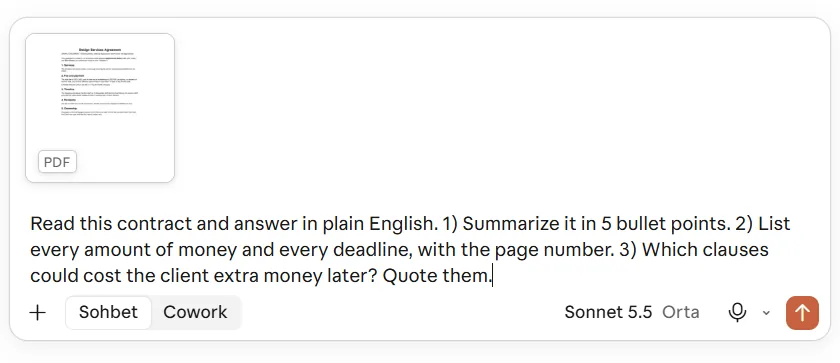
Open a new chat, click + in the message box and choose the file, or drag the PDF into the window. Then type your questions in one message. Numbered questions get numbered answers, which are easier to check.
Read this contract and answer in plain English. 1) Summarize it in 5 bullet points. 2) List every amount of money and every deadline, with the page number. 3) Which clauses could cost the client extra money later? Quote them.
Step 2: check the summary
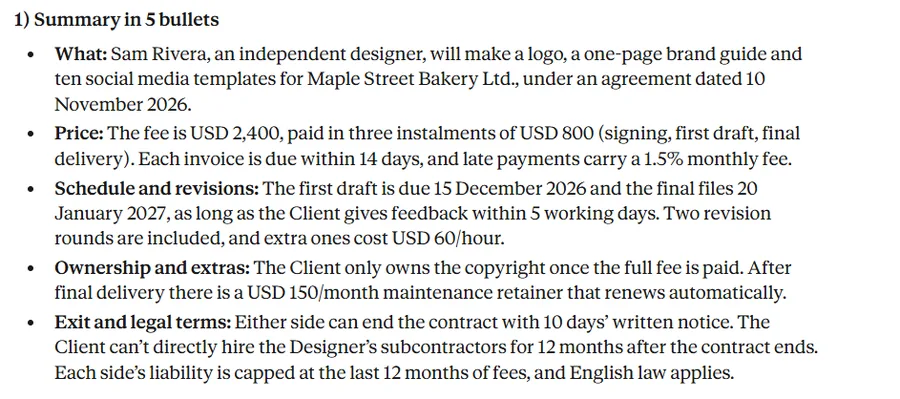
The answer came back in about 25 seconds. All five bullets matched the contract: the parties, the USD 2,400 fee in three USD 800 payments, the dates, the two revision rounds and the retainer.
Step 3: check the money and deadline tables
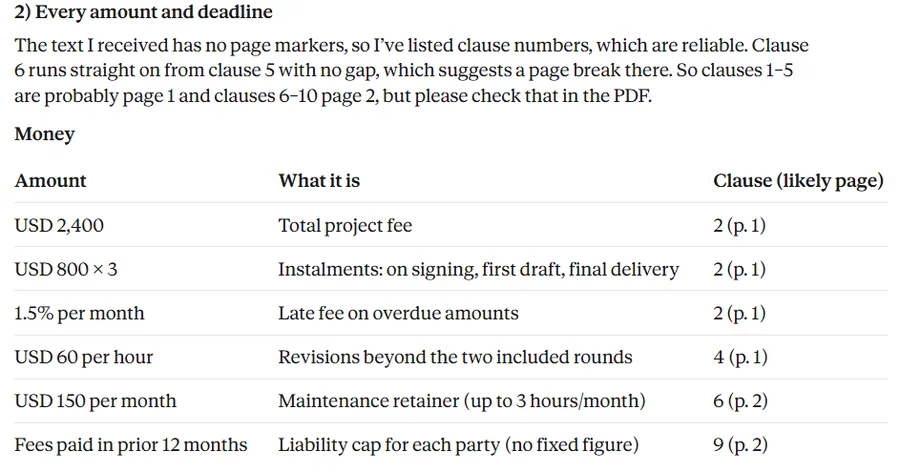
Claude listed six amounts and ten deadlines, and it did not invent any. It also told us that the text it received had no page markers, so it gave clause numbers and guessed where the page break was. The guess was right (clauses 6 to 10 are on page 2), but this is the part to check yourself.
Step 4: read the extra-cost list
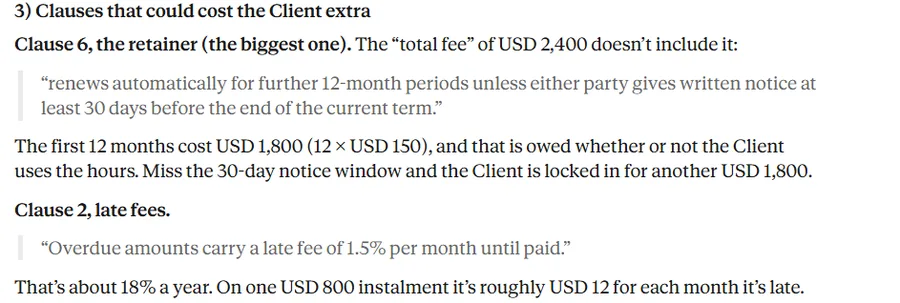
This was the real test. Claude put the retainer first: USD 150 a month for 12 months is USD 1,800 on top of the USD 2,400 "total fee", and it renews unless someone gives notice 30 days before the term ends. It also worked out that the 1.5% monthly late fee is about 18% a year.
What Claude got right
- Every amount and deadline was correct.
- It found the hidden retainer and did the USD 1,800 sum.
- It quoted the clause text word for word, so you can find it in the PDF.
What to check yourself
- The page numbers were a guess, and Claude said so.
- The answer ends with "not legal advice". For a real contract, ask a lawyer about the clauses Claude flags.
Part 2: analyze an Excel file (sales data)
Step 1: attach the .xlsx file
Same as before: + in the message box, or drag and drop. If the Excel file is refused, turn on code execution in Settings > Capabilities.
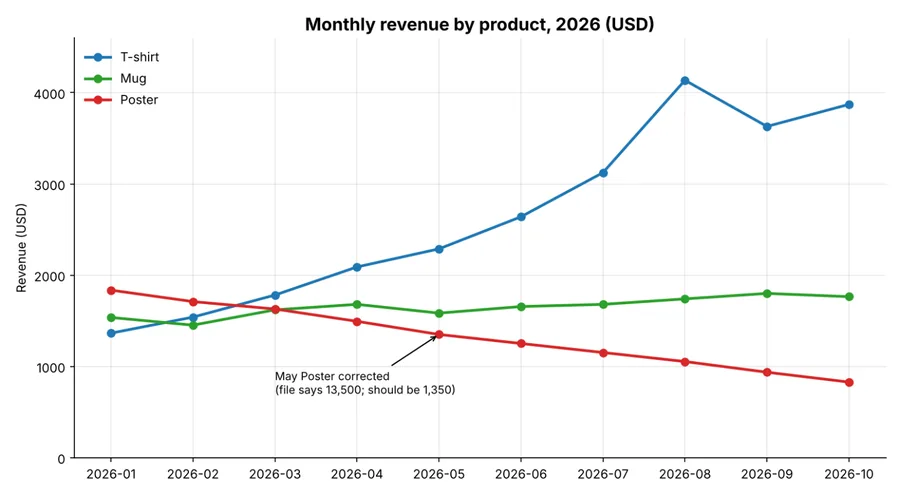
Analyze this spreadsheet. 1) What is the total revenue, and which month was best? 2) Which product is growing and which is shrinking? 3) Check the data for mistakes or missing values. 4) Make a chart of monthly revenue by product.
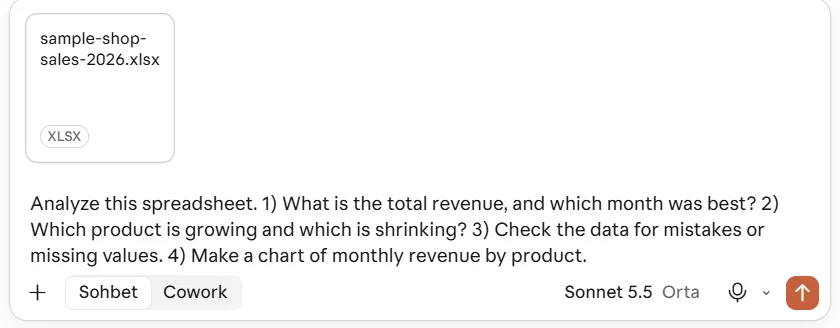
Step 2: Claude runs code on the file
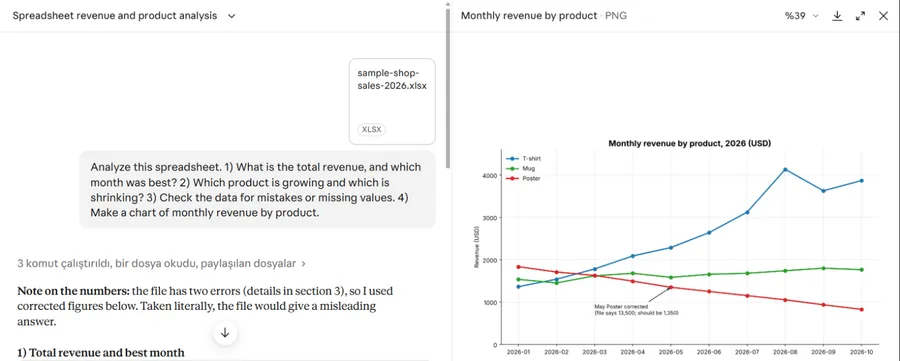
Instead of guessing from the text, Claude ran code on the spreadsheet ("ran 3 commands, read a file"), and the chart opened in a panel next to the chat. It took about 30 seconds.
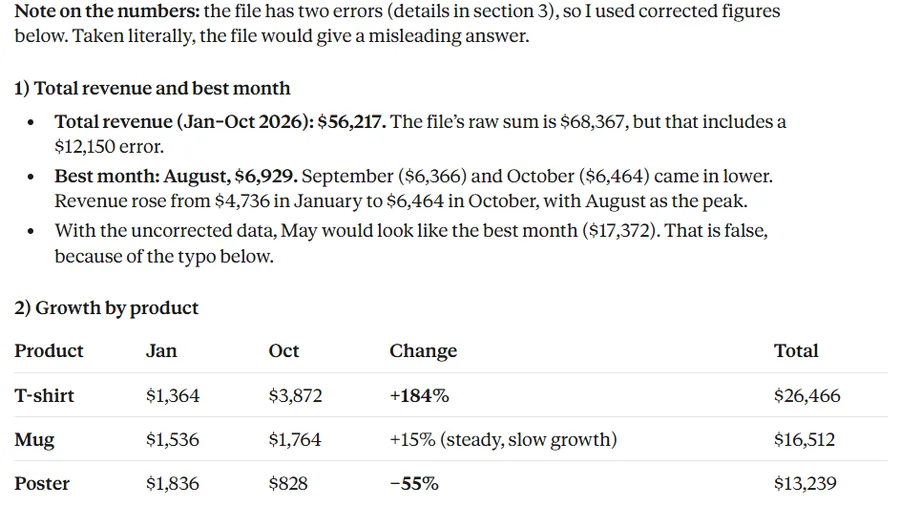
Step 3: totals and best month
Claude opened with a warning: the file has two errors, so it used corrected figures. The corrected total was USD 56,217 and the best month was August (USD 6,929). Both are right. Read literally, the file adds up to USD 68,367 and makes May look like the best month, and Claude pointed that out too.
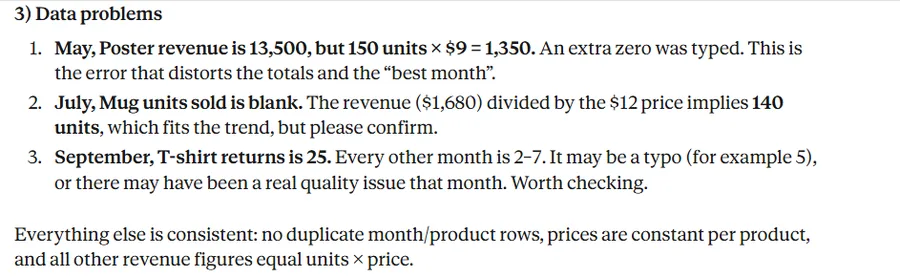
Step 4: the mistakes it found
It found all three problems we planted: the extra zero in May's poster revenue, the blank "units sold" cell for mugs in July (it worked out 140 from revenue divided by price and asked us to confirm), and 25 returns in September when every other month had 2 to 7. It also checked that nothing else was wrong, which was true.
Step 5: the chart
The chart uses the corrected May value and labels the fix. Claude did not change our original file; it offered to make a cleaned copy with revenue formulas.
What Claude got right
- The corrected total, the raw total and the best month were all right.
- All three planted problems were found, with no false alarms.
- It said which numbers it changed and why.
What to check yourself
- If you only want the raw sum, say so. Claude corrected the data on its own.
- A 30-row test is small. With big files, ask Claude to show the formula or code it used.
Prompts you can copy
List every fee, deadline and automatic renewal in this document, with the clause number. Then tell me which ones could cost me money later.
Put the date, seller, every line item, tax and total into a table. Check that the line items add up to the total.
Summarize this report in 10 bullet points for someone who has 2 minutes. Then list anything that looks uncertain or contradicts itself.
Check this spreadsheet for typos, blank cells and values that do not fit the pattern. List each one with its row. Do not change the data yet.
Group the free-text answers in column C into 5 themes, count the answers in each theme and give two example quotes per theme.
Before you upload: privacy
- Do not upload files with passwords, card numbers, ID numbers or other people's health data. Remove names you do not need.
- On Free, Pro and Max you choose whether your chats can be used to train Anthropic's models: Settings > Privacy > Help improve our AI models. Turning it off applies to new chats.
- Files you have uploaded are listed under Settings > Privacy > Uploaded files, where you can manage them.
- If you would rather not upload a spreadsheet at all, our CSV sales checker finds sales peaks and percentage changes in your browser without sending the file anywhere.
Free or paid?
File analysis is not limited to paid plans, but long files use up your usage limit faster, and the Free plan has the lowest limits. Claude Pro was USD 20 a month (USD 17 a month billed yearly) on Anthropic's pricing page on 7 November 2026. Prices for all four big assistants are in our ChatGPT vs Claude vs Gemini vs Grok comparison.
Frequently asked questions
Can Claude read a scanned PDF?
Anthropic says Claude reads both the text and the visuals in PDFs of up to 100 pages, so pages that are images can be read. We did not test a scanned file, so try one page first.
Can Claude edit my Excel file?
With code execution and file creation on, it can create a new .xlsx, .docx, .pptx or PDF file. In our test it did not change the original file and offered a cleaned copy instead.
How big can the file be?
The help centre lists up to 500 MB per file and 20 files per chat for chat uploads, and up to 1,000 pages for a PDF. The file-creation tool works with files up to 30 MB. Very long files also use up your usage limit faster.
Which model did you use?
Claude Sonnet 5.5 at the default effort setting, in the claude.ai web app, on 7 November 2026. The model menu describes Sonnet as the most efficient model for simpler tasks.
Is the answer always right?
No AI answer is guaranteed. Claude got every number right in our test, but the interface itself warns that Claude can make mistakes. Check totals with a formula and read the quoted clauses in the original file.
Sources (November 7, 2026)
Related pages
Kuponaut has no affiliate link with Anthropic or Claude, and nothing on this page earns a commission. Some links elsewhere on Kuponaut are affiliate links and may earn us a commission at no extra cost to you.